Jido Assembly: A Slack clone built with Jido and Hologram
Jido Assembly is a showcase for what the Jido ecosystem can build.
It is a Slack clone.
We built it as an architecture case study for agent-native applications. People chat in channels, direct messages, and threads. Jido Agents join those rooms as participants. Jido Messaging persists the chat model. Jido Chat connects the main ops room to Telegram and Discord. Hologram provides the interactive Elixir user interface.
In Assembly, agent-native means that Agents use the same rooms, messages, threads, and events as people. They are application participants, not a separate chatbot feature. A Jido Agent is a module with state and behavior that runs through the Jido runtime. It is different from Elixir's Agent abstraction.
Assembly puts that model in one working application. A person can start an Agent round. Agent replies appear in the same room as human messages. When a bridge is configured, top-level messages from the Assembly composer can also fan out to Telegram and Discord. Every subscribed client can receive the committed result.
What Assembly includes
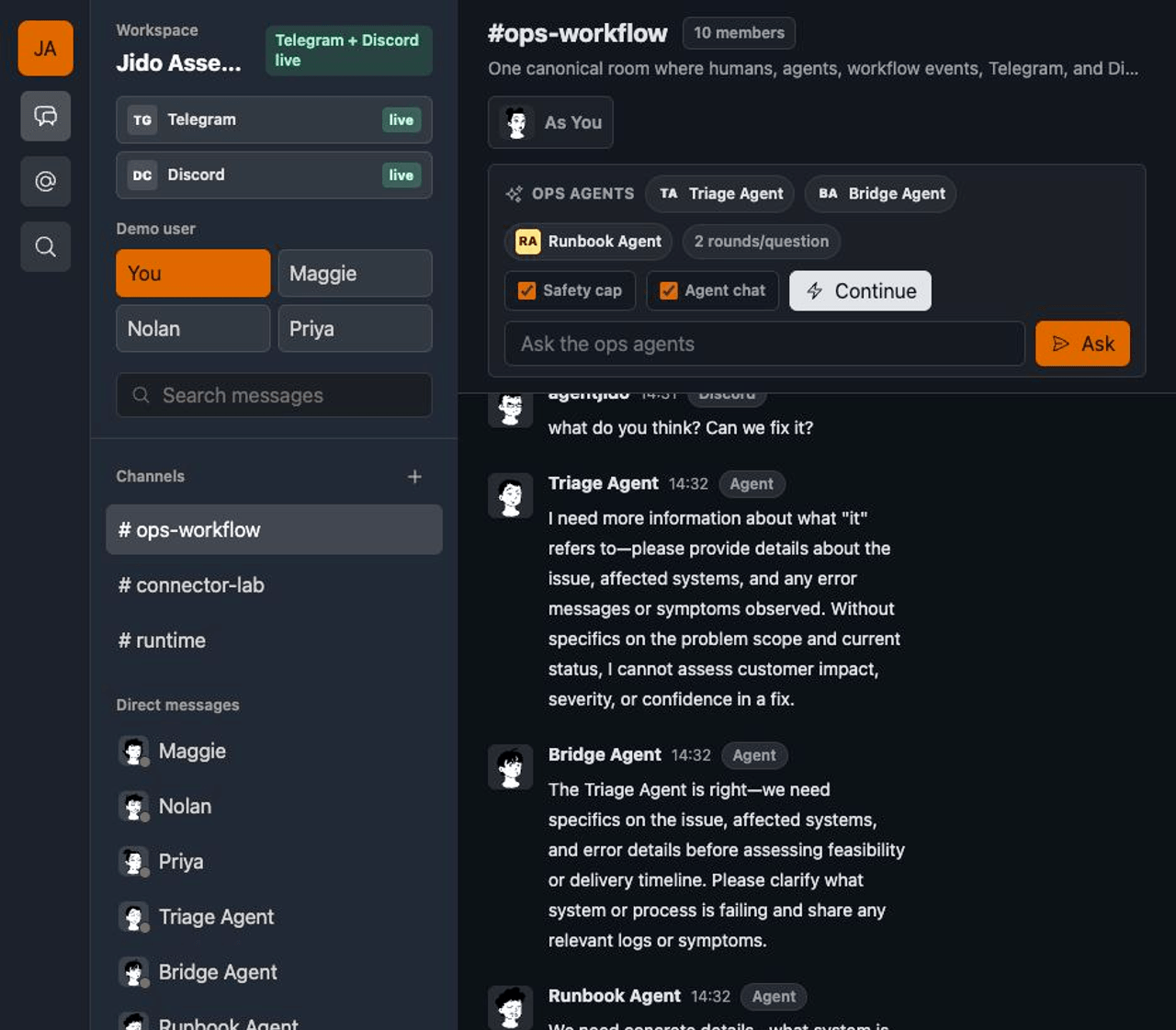
Assembly includes the features expected from a team chat application: channels, direct messages, threads, reactions, mentions, search, presence, and mobile room switching.
That scope gives every part of the system real work to do. The application handles concurrent participants, durable state, room-level routing, real-time updates, Agent execution, and external provider boundaries. It shows how the Jido packages compose beyond a small Agent example.
Assembly is a developer showcase, not a production Slack replacement. It does not include authentication, authorization, file uploads, enterprise administration, or Slack API compatibility.
The seeded #ops-workflow room adds the Jido parts. It contains three Agents, sample provider traffic, and workflow data. The developer inspector displays the Signals and message metadata behind the interface.
The default workspace runs without an LLM key or provider credentials. Seeded data keeps the interface available for inspection. Add an Anthropic key to run live Agent rounds. Add Telegram or Discord credentials to connect live services.
Follow a message through Assembly
A local message passes through three required stages. It can enter a fourth stage when a provider bridge is configured.
1. A person sends a message
A Hologram action receives the browser event. It updates local component state, such as the draft and pending status, then sends a Hologram Command to the server.
This is the client side of the send path, condensed from Jido.Assembly.Pages.Assembly.action/3:
component
|> put_state(:draft, "")
|> put_state(:send_pending, true)
|> put_command(:persist_message,
  room_id: component.state.active_room_id,
  body: draft,
  sender_id: component.state.current_user.id
)
The Command calls the Assembly chat context. That context writes the message through Jido Messaging and its SQLite adapter. Jido Messaging provides the canonical room, participant, message, thread, and reaction records for the application.
The server side persists the message, returns an action to the current browser, and broadcasts the same action to the workspace. This example is condensed from Jido.Assembly.Pages.Assembly.Commands.command/3 and its broadcast helper:
case Chat.send_message_command(
       params.room_id,
       params.body,
       params.sender_id,
       route_outbound: true
     ) do
  {:ok, message, signals} ->
    action_params = %{
      room_id: message.room_id,
      message: message,
      connector_snapshot: Chat.connector_snapshot(message.room_id),
      signal: SignalPresenter.summary(signals, "jido.messaging.room.message_added")
    }

    server
    |> put_action(:message_saved, action_params)
    |> put_broadcast(
      {:workspace, Chat.workspace_id()},
      :message_saved,
      action_params
    )
end
2. Jido Agents respond in the room
Jido supplies the Agent runtime. Jido AI adds LLM-backed Agent Strategies and model access through ReqLLM. Agent execution is on demand. A person types a prompt in the ops Agent panel and selects Ask to start a round.
Assembly defines three Agents in #ops-workflow:
- Triage Agent focuses on impact and severity.
- Bridge Agent explains provider and delivery state.
- Runbook Agent proposes checks, approvals, and handoffs.
Each Agent is a standard Jido AI Agent module:
use Jido.AI.Agent,
  name: "assembly_triage_agent",
  model: :assembly_haiku,
  max_iterations: 2,
  streaming: false
Assembly starts a short-lived runtime for each Agent turn. An Agent receives recent room context and returns a bounded response. In this demo, a round can run at most three Agents, a prompt can continue for two rounds, and each reply is limited to 420 characters. When Agent-to-Agent chat is active, a later Agent can read responses from the Agents that ran before it.
An Agent response does not use a separate AI persistence path. Assembly sends it through the same chat command as a human message. It receives the same message, Signal, thread, reaction, and search behavior.
3. The committed event updates each client
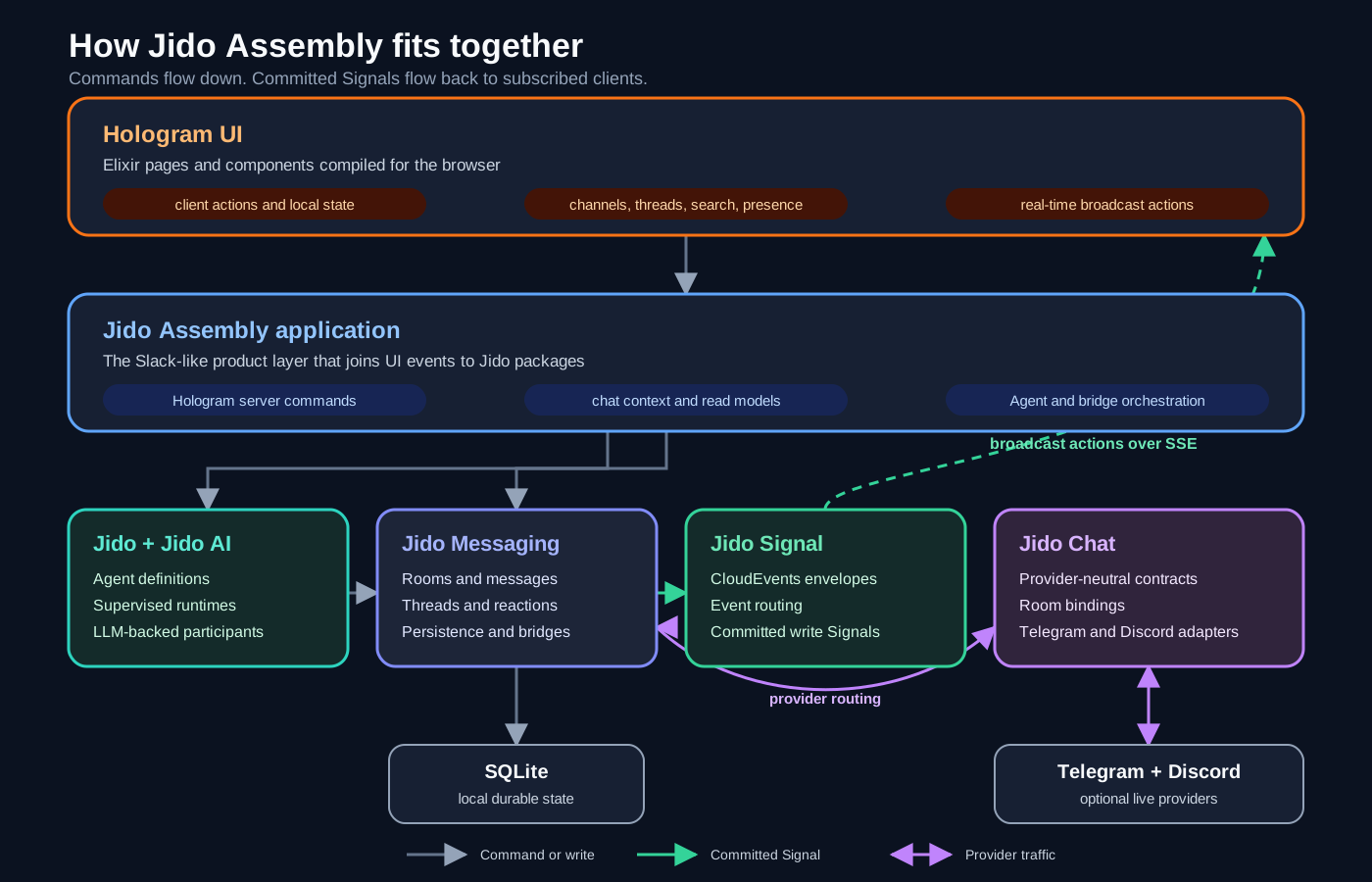
Jido Messaging returns Signals after it commits a durable change. A Signal is a structured event with a type such as jido.messaging.room.message_added. Jido Signal provides the CloudEvents-compatible envelopes and routing for these events.
Assembly sends the resulting Hologram action to the current browser and broadcasts it to the workspace. Other subscribed clients receive the update through Server-Sent Events. The developer inspector shows the committed Signal metadata, so you can inspect the event that caused each user interface update.
The same commit-and-broadcast pattern applies to messages, reactions, and room creation. Presence is different. Phoenix Presence tracks temporary session state, and Assembly broadcasts normalized presence Signals to connected clients.
4. Telegram and Discord join the room when configured
Jido Chat defines provider-neutral targets and payloads. The Telegram and Discord adapters implement those contracts for each service.
Assembly binds those providers to the canonical #ops-workflow room. An incoming Telegram or Discord message can become a normal room message. A top-level message sent from the Assembly composer can route through every configured adapter.
The provider changes, but the conversation model does not. People, Agents, Telegram participants, and Discord participants can take part in the same room.
The boundaries are explicit. Incoming provider messages do not start Agent rounds automatically. Agent replies are stored in the canonical room, but Assembly does not fan them out to providers by default.
Why we chose Hologram
We chose Hologram as the user interface layer for Assembly. It lets the project use Elixir for both browser behavior and server operations.
LiveView keeps its primary view state in server-side socket assigns. Browser events usually reach the LiveView process. That process updates its state and sends rendered diffs to the browser. Client-only behavior can use JavaScript commands or hooks. This model works well for server-oriented Phoenix applications. The LiveView documentation describes this process and event model.
Hologram keeps component state in the browser and compiles the required Elixir code to JavaScript. Actions run on the client. Commands run on the server when the interface needs a database, API, or other protected resource. Hologram uses HTTP/2 for Action-to-Command requests and Server-Sent Events for broadcast actions. Its architecture guide documents this split.
| Concern | LiveView | Hologram |
|---|---|---|
| Primary state | Server socket assigns | Browser component state |
| Client-only behavior | JavaScript commands or hooks | Actions compiled from Elixir |
| Server work | LiveView event handlers and application contexts | Commands and application contexts |
| Server-to-client updates | Rendered diffs over the LiveView connection | Broadcast actions over Server-Sent Events |
Assembly has many local interface events. People switch rooms, open threads, edit drafts, select demo participants, and operate panels. Hologram runs these actions in the browser with Elixir code. Durable writes, Agent calls, searches, and bridge operations remain server Commands.
That split fits the event flow shown in the walkthrough. One browser performs a Command. Jido Messaging commits the change and produces Signals. Hologram then applies an action to the current browser and broadcasts it to other subscribed browsers.
LiveView could support this application. We chose Hologram because its client action, server Command, and broadcast model maps directly to Assembly's local and durable events. It also keeps the interface logic in Elixir.
There is a tradeoff. Hologram does not yet provide a LiveViewTest-style API for full in-process interaction tests. Assembly unit-tests Actions and Commands, then reserves browser tests for JavaScript behavior, SSE delivery, and cross-tab updates.
The packages behind the walkthrough
Each package has one clear role in the application.
| Package | Responsibility in Assembly |
|---|---|
| Jido and Jido AI | Run the Triage, Bridge, and Runbook Agents. |
| Jido Messaging | Own rooms, participants, messages, threads, reactions, persistence, and bridge policy. |
| Jido Signal | Represent and route committed application events. |
| Jido Chat | Connect provider-neutral chat operations to Telegram and Discord. |
| Hologram | Run client Actions, call server Commands, and apply real-time user interface updates. |
The responsibilities stay separate. Jido AI produces an Agent response, but Jido Messaging owns the room and message records. Jido Chat connects providers, but it does not create a second message model. Jido Signal carries committed events. Hologram applies those events to the interface.
Why Elixir/OTP and the BEAM matter
Assembly runs many independent activities at the same time. People send messages. Jido starts a separate, short-lived runtime for each Agent turn. Provider adapters receive external events. Phoenix tracks presence and distributes updates. Hologram keeps active client connections open.
The BEAM is built for concurrent work. Its lightweight processes isolate each activity. They communicate with messages instead of shared mutable state. A slow Agent response or provider request can occupy its own process without stopping other chat activity.
OTP supervision gives long-running services clear failure boundaries. A failed supervised process can restart without restarting the application. Phoenix PubSub and Presence use the same runtime model to distribute room updates and track connected participants.
Elixir adds pattern matching, immutable data, and explicit data transformations. Those features fit the records and events that move between the packages. The result is one runtime model for Agent execution, message persistence, presence, provider traffic, and real-time interface updates.
Get building
Assembly is small enough to read as a reference application. Start with app/pages/assembly_page.ex for client Actions. Continue with app/pages/assembly/commands.ex for server Commands, lib/jido_assembly/chat.ex for messaging, lib/jido_assembly/agents.ex for Agent rounds, and lib/jido_assembly/bridges.ex for provider routing.
After the project starts, open #ops-workflow. Send a message. Run an Agent round. Add a reaction. Open the developer inspector and follow the resulting Signals.
- Run Jido Assembly for setup steps, provider configuration, testing notes, and project limits.
- Get started with Jido to build your first Agent.
- Explore the Jido ecosystem to see the packages used by Assembly.
Jido Assembly shows the complete composition in one place: an Elixir interface, durable messaging, on-demand Agents, structured events, and optional provider bridges running together on the BEAM.